Understand how DRMtoday Callback Authorization works, how your backend validates users
in real time, and how to configure the callback endpoint for your organization.
When a user triggers a license request, DRMtoday must receive a
Customer Rights Token (CRT) that defines whether playback is allowed
and under what conditions. Without this authorization, no license is issued.
With Callback Authorization (mode value CALLBACK), the
player sends a license request directly to DRMtoday with identifying context in the
x-dt-custom-data header. DRMtoday then calls your backend
at the configured callback URL, asks whether the user is authorized, and expects an HTTP
200 response containing the CRT. Only after your backend approves does DRMtoday issue
the DRM license.
Unlike Token Authorization, the CRT is not
pre-embedded in a JWT — it is determined at license-request time by your server.
Operational workflow
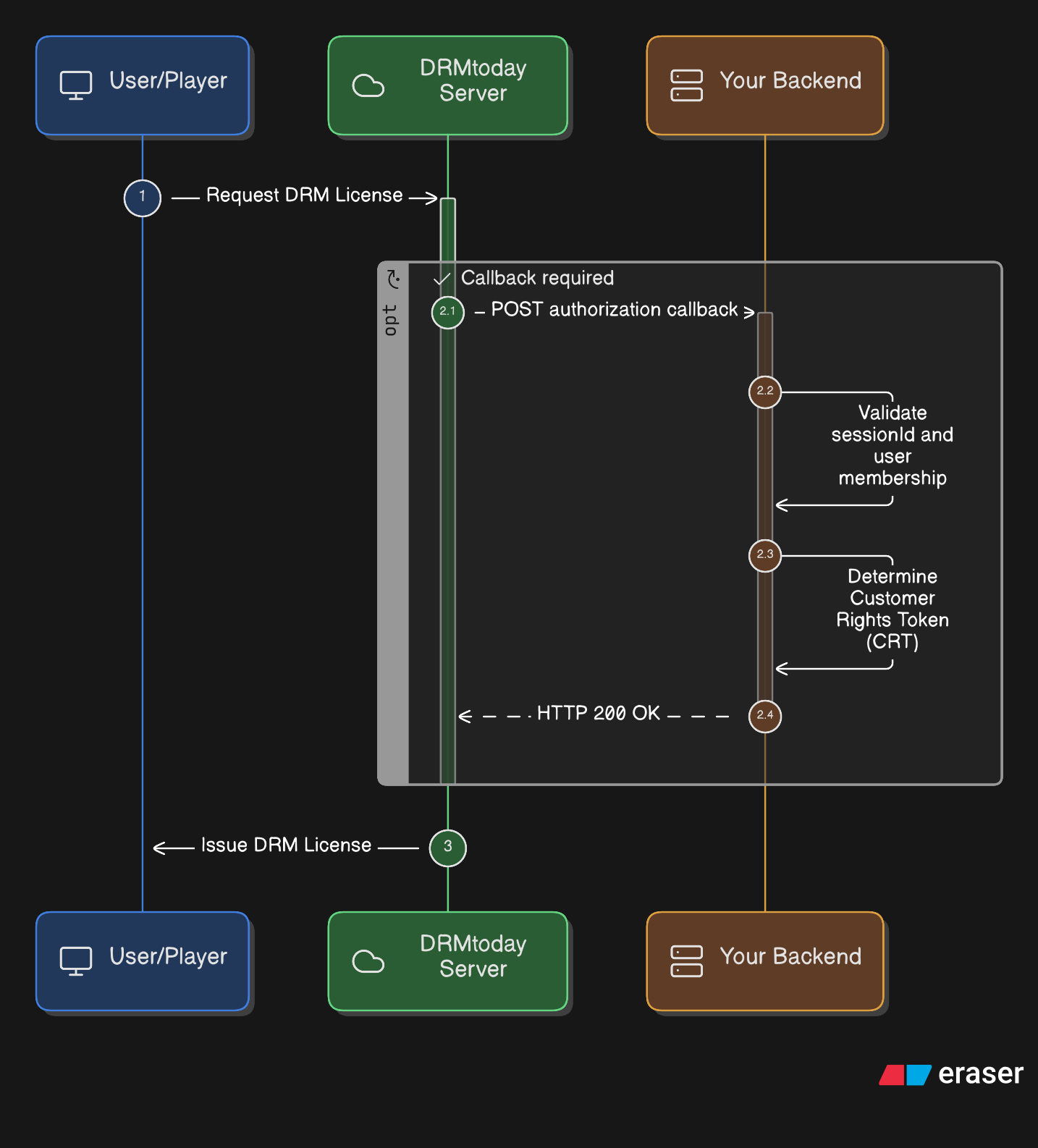
Callback Authorization flow — DRMtoday calls your backend before issuing a license.
Request DRM license — The player sends a license request to
DRMtoday with x-dt-custom-data (see
Sending custom data).
Authorization callback — DRMtoday POSTs to your callback URL with
asset and session details from the request.
Validate session — Your backend validates the
sessionId and confirms the user is authorized (membership, subscription,
rental status, etc.).
Determine CRT — Your backend builds the Customer Rights Token for
this user, asset, and session.
Respond HTTP 200 — Your backend returns the CRT as JSON in the
response body.
Issue DRM license — DRMtoday receives the CRT and delivers the
license to the player.
Sending custom data in license requests
In Callback mode the player does not carry a pre-signed JWT. Instead, it sends a
Base64-encoded JSON object in the license request header so DRMtoday can forward the
context to your callback endpoint.
1. Build the custom data object
The player (via your application / browser) attaches these fields:
The assetId is typically passed in the license server URL (e.g.
?assetId=CPIX-test for Widevine), not inside x-dt-custom-data.
3. Your backend validates on callback
When DRMtoday POSTs to your callback URL, use the session and asset information in the
request body to look up the user, verify entitlements, and return the appropriate CRT.
The player never receives the CRT directly — only DRMtoday does.
Security guarantees
Callback Authorization shifts the authorization decision to a server-to-server call
that the client cannot bypass:
Threat
How Callback Authorization mitigates it
User bypasses entitlement checks
License issuance is blocked until your backend returns HTTP 200 with a valid CRT. The player cannot skip the callback step.
Forged or replayed session
Your backend validates sessionId (and optionally user membership) on every license request — authorization is evaluated in real time.
Client-side CRT tampering
The CRT is returned server-to-server from your backend to DRMtoday. The player never constructs or modifies the CRT.
Excessive playback rights
Your callback logic determines the CRT per request — rental duration, play window, and asset scope are under your control.
Unreachable or misconfigured callback
If your endpoint does not respond with HTTP 200 and valid CRT JSON, DRMtoday refuses to issue a license — content stays protected.
In summary: the player provides identity context
(userId, sessionId, merchant), DRMtoday acts as
the broker, and your backend is the
authorization authority that decides whether and how content may be
played. See also Token Authorization for the
alternative upfront-token model.
Comparison with Token Authorization
Feature
Callback Authorization
Token Authorization
Primary flow
Player → DRMtoday → Backend → DRMtoday
Player → Backend → Player → DRMtoday
Required header
x-dt-custom-data
x-dt-auth-token
CRT delivery
Returned by your backend in callback JSON
Embedded in signed JWT (crt claim)
Security model
Real-time session validation on your server
JWT signature with shared secret (HS256)
Configure the callback endpoint
Before enabling Callback Authorization, prepare a publicly reachable HTTPS endpoint
that DRMtoday can POST to, and define the CRT JSON your handler will return.
Define the CRT profile
The CRT describes playback rights DRMtoday should encode into the license. Use the
Set CRT page in this demo to view or edit the CRT JSON
stored on the server.
In production, your callback handler should build the CRT dynamically based on the
asset, user, and session received in the callback request — not return a static file
for every user.
Implement the authorization callback
Your callback endpoint must accept POST requests from DRMtoday, validate the session,
and respond with HTTP 200 OK and CRT JSON in the body.
In this demo environment, the callback is implemented at:
callbacks/drmtoday-auth-callback.php
Minimum handler responsibilities:
Parse the JSON body DRMtoday sends (asset ID, session ID, user context).
Validate that the sessionId is active and the user is entitled to watch.
Build or load the CRT for the requested asset.
Return HTTP 200 with the CRT as JSON (use adapter JSON_V1 unless DRMtoday specifies otherwise).
Important: The callback URL must be reachable from DRMtoday
infrastructure over HTTPS. Test connectivity before switching production traffic to
Callback mode.
Enable Callback Authorization
Register your callback URL and switch the organization's license delivery mode to
Callback authorization (CALLBACK). You can do this through
the CastLab GUI or via the DRMtoday REST API.
After enabling Callback Authorization:
Players send x-dt-custom-data instead of x-dt-auth-token.
DRMtoday POSTs to your callback URL on each license request.
No shared secret is required for signing JWTs (unlike Token Authorization).
Using the CastLab GUI
The CastLab GUI is the DRMtoday web dashboard used to manage organizations and license
delivery authorization.
Step 1 — Sign in and select your organization
Open the DRMtoday dashboard:
Staging: https://fe.staging.drmtoday.com
Production: https://fe.drmtoday.com
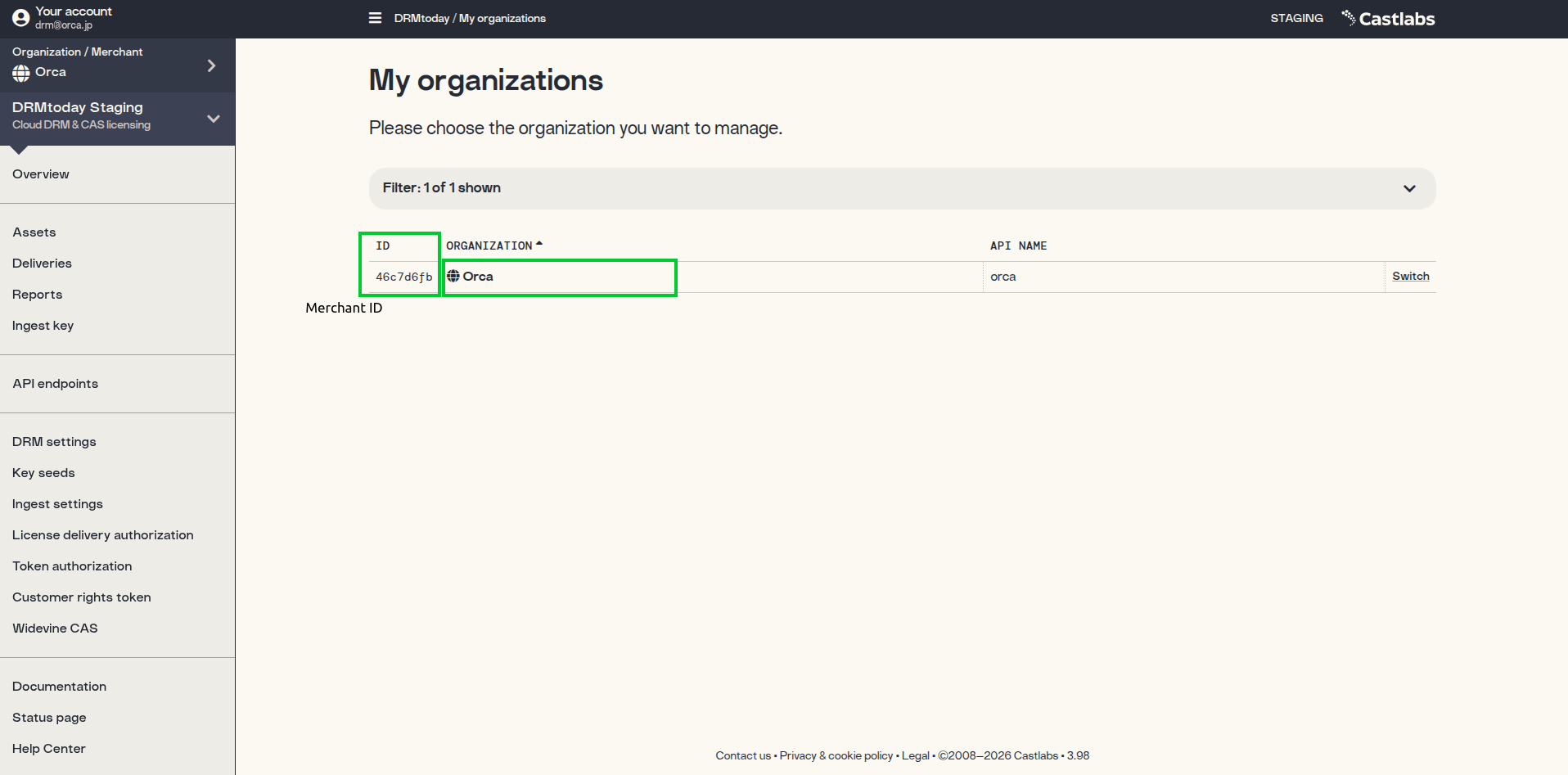
Log in and click Switch on your organization.
My organizations — copy the ID as ORGANIZATION_ID.
Step 2 — Open License Delivery Authorization
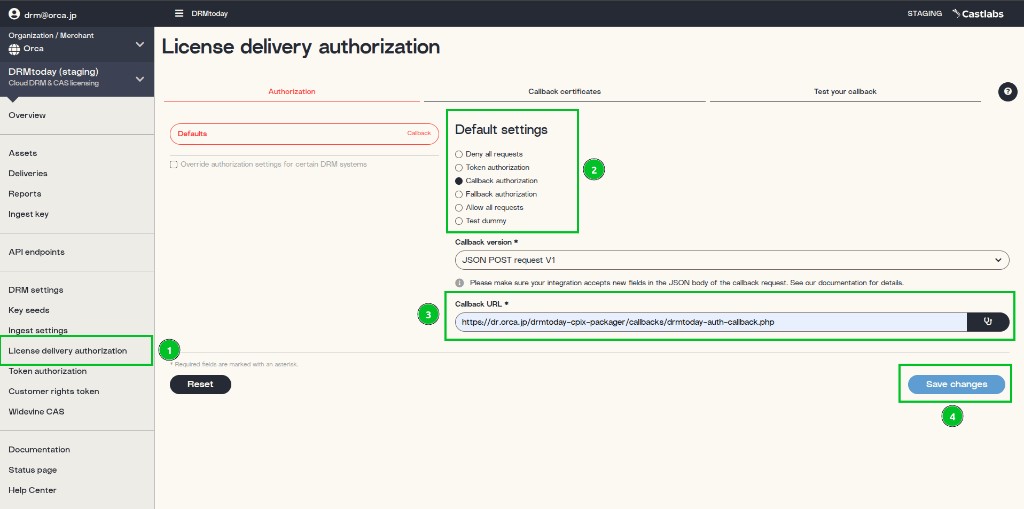
In the left sidebar, click License delivery authorization.
Open the Authorization tab.
1 — Open License delivery authorization in the sidebar;
2 — Select Callback authorization;
3 — Set callback version and URL;
4 — Click Save changes.
Step 3 — Register callback URL and save
Under Default settings, select
Callback authorization (step 2 in the screenshot above).
Set Callback version to JSON POST request V1 and enter
your publicly reachable Callback URL (e.g.
https://your-server/callbacks/drmtoday-auth-callback.php) (step 3).
Click Save changes (step 4).
You can also use the Test your callback tab in the same screen to
verify DRMtoday can reach your endpoint.
Via the DRMtoday REST API
Switch the organization to CALLBACK programmatically using the DRMtoday CAS
protocol (same flow as Token Authorization — see
Token Authorization API steps for
CAS login details).
Prerequisites
DRMtoday API credentials — username and password for CAS login.
Organization ID — your merchant UUID.
Callback URL — public HTTPS endpoint that returns CRT JSON.
The License delivery authorization panel should show
CALLBACK as the current active method (use
Switch to CALLBACK if needed).
Fill in User ID, Session ID,
Merchant, and Asset ID, then click
Load Video.
Confirm drmConfig headers
In the Player Options panel, verify that drmConfig
includes licenseHeaders with x-dt-custom-data — a Base64-encoded
JSON object containing userId, merchant, and
sessionId.